
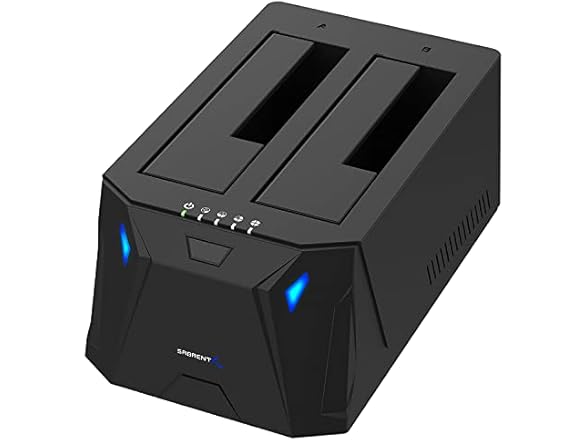
USB 3.0 to SATA Dual Bay Docking Station
Categories
The Sabrent SATA Hard Drive Docking Station enables you to access desktop or laptop hard drives without the frustration of assembling hard drive enclosures By inserting a 2 5"/3 5" SATA hard drive directly into this docking station you can quickly access drive contents and transfer files Plus you can swap out hard drives effortlessly with plug and play mounting Transfer data quickly and easily through USB 3 0 at speeds up to 5Gbps To use Hard Drive Offline Clone Function 1 Insert Source Disk into hard drive bay A then insert Target Disk into hard drive bay B 2 Make sure that the USB cable is disconnected from your computer 3 Connect power supply and switch on power 4 Hold down the CLONE button release when you see a Blue LED 5 Then quickly press the CLONE Button 6 A Blue LED will flash on 25% indicating that the cloning process has begun 7 The cloning process is complete when ALL the lights turn solid Blue (25%-100%) 8 Finally press the power switch to the OFF position and eject your drives System requirements Windows MAC OS Package Contents Docking Station Power Supply USB 3 0 cable User Manual
- Supports Standard Desktop 2.5"/3.5" SATA Hard Drives or SSD.
- Supports hard drives up to 10TB.
- Plug and play, no drivers needed.
- Supports Offline Cloning up to 60Mbps.
- Supports Transfer Speeds up to 5Gbps (USB 3.0),480Mbps (USB 2.0), 12Mbps (USB 1.1)
Shipping Note: Shipping to Alaska, Hawaii, APO addresses, or PO Boxes is not available for this item.
Warranty: 90 Day Woot Limited Warranty
In the box:
SABRENT USB 3.0 to SATA I/II/III Dual Bay External Hard Drive Docking Station (EC-HD2B)
SABRENT EC-HD2B USB 3.0 to SATA I/II/III Dual Bay Externa
ASIN: B0759567JT
Standard Shipping
Excluded States:
AA • AE • AK • AP • AS • FM • GU • HI • MH • MP • PR • PW • VI
PO Boxes:
Not Accepted
Purchase Limit:
10 per customer